Device Onboarding
Anava's Device Onboarding system provides secure, automated provisioning for Axis cameras using industry-standard PKI authentication. Devices are authenticated using their factory-installed Axis device ID certificates, ensuring only legitimate hardware can join your fleet.
Key Capabilities
| Feature | Description |
|---|---|
| Zero-trust Authentication | Every device authenticated via PKI before joining |
| 802.1AR Compliance | Uses Axis factory-installed device ID certificates |
| Automated Provisioning | One-click enrollment from the Console |
| Multi-path Bootstrap | MQTT primary, HTTP fallback for network diversity |
| Audit Trail | Complete record of all provisioning events |
How It Works
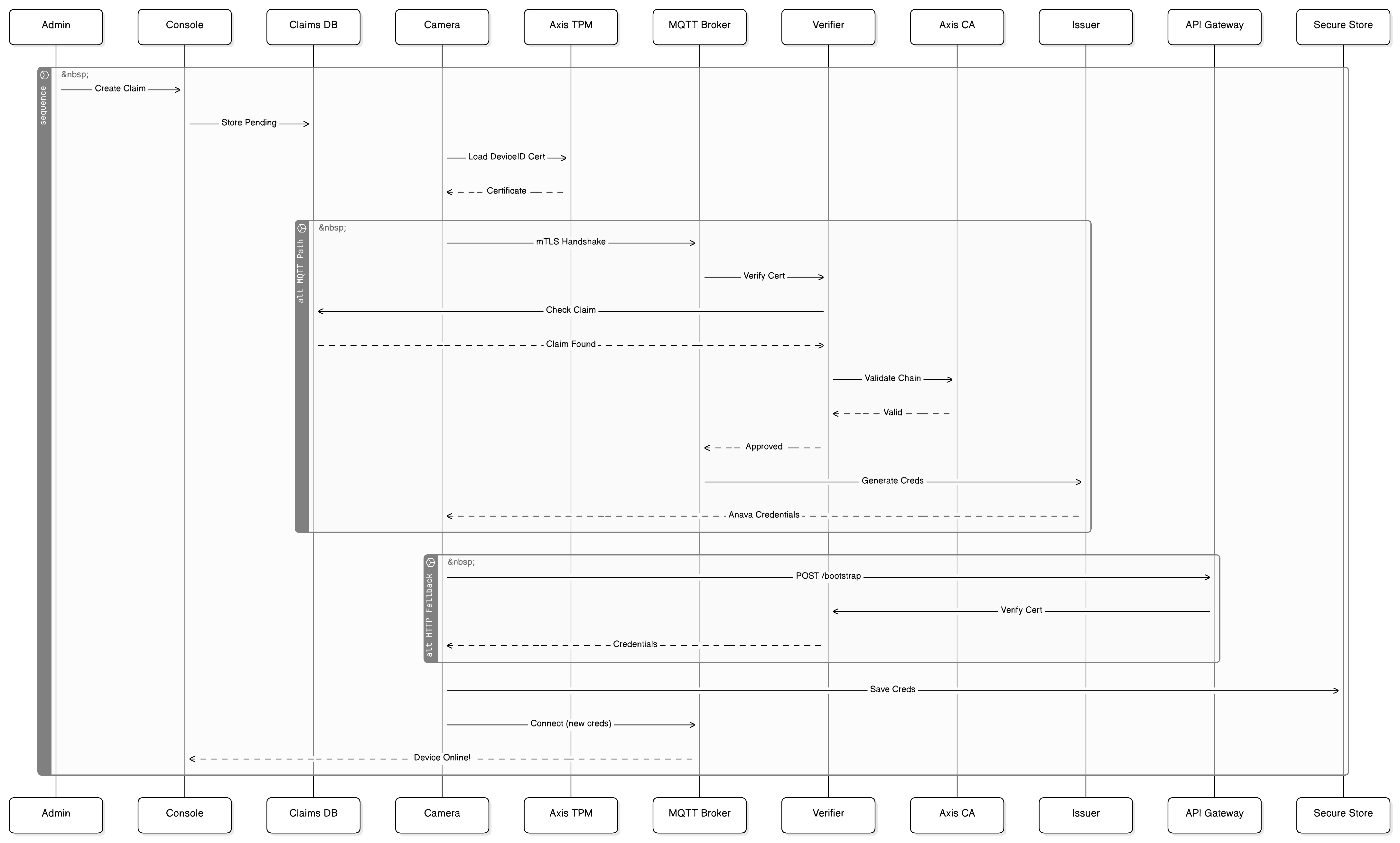
Authentication Flow
Step 1: Device Identity
Every Axis camera ships with a factory-installed Axis Device ID certificate. This certificate:
- Is burned into the device's secure element at manufacturing
- Cannot be extracted or cloned
- Is signed by the Axis Device ID CA chain
- Uniquely identifies the device by serial number
Step 2: Claim Request
When you claim a device in the Console:
- Enter the device serial number (from label or web UI)
- Assign to a device group
- Generate a one-time provisioning token
Step 3: Bootstrap
When the ACAP boots, it initiates the bootstrap process:
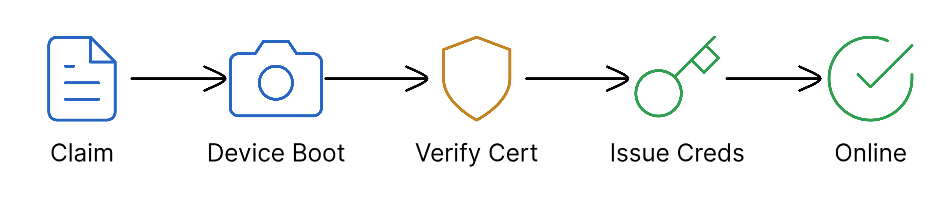
Step 4: Certificate Verification
The cloud performs rigorous verification:
| Check | Description |
|---|---|
| Chain Validation | Certificate chains to Axis Root CA |
| Revocation | Certificate not on revocation list |
| Serial Match | Certificate serial matches claim |
| Time Valid | Certificate not expired |
| Signature | Cryptographic signature valid |
Step 5: Credential Issuance
Upon successful verification, the device receives:
- MQTT Client Certificate: For ongoing mTLS connection
- Broker Configuration: Hostname, port, topics
- Group Assignment: Detection configuration to apply
- Device Token: For cloud API access
Bootstrap Methods
Primary: MQTT Bootstrap
Uses the MQTT broker's authentication endpoint with TLS client certificates:
Port: 8884 (MQTT over TLS with client cert)
Protocol: MQTT 3.1.1
Auth: Axis DeviceID certificate as client cert
Fallback: HTTP Bootstrap
When MQTT is unavailable (firewall, outage), devices use HTTP:
Endpoint: https://api.anava.ai/v1/devices/bootstrap
Method: POST
Auth: Mutual TLS with Axis DeviceID certificate
The HTTP fallback ensures devices can still provision even if:
- MQTT port (8884) is blocked by corporate firewall
- MQTT broker is temporarily unavailable
- Network only allows HTTPS traffic
Certificate Chain

Provisioning States
| State | Description | Console Display |
|---|---|---|
| Unclaimed | Device not known to system | - |
| Pending | Claim created, awaiting device | 🟡 Pending |
| Bootstrapping | Device connecting, verifying | 🟡 Connecting |
| Provisioned | Credentials issued successfully | 🟢 Online |
| Failed | Verification failed | 🔴 Failed |
| Rejected | Certificate invalid or revoked | 🔴 Rejected |
Security Features
Mutual TLS (mTLS)
All bootstrap communications use mutual TLS:
- Server presents valid certificate (Let's Encrypt or Google Trust)
- Device presents Axis DeviceID certificate
- Both parties verify the other
One-Time Tokens
Provisioning tokens:
- Expire after 24 hours
- Single-use (consumed on successful provision)
- Tied to specific serial number
- Can be revoked before use
Credential Storage
On-device credentials are stored securely:
- Encrypted at rest
- Stored in ACAP's private storage
- Inaccessible to other applications
- Cleared on ACAP uninstall
Troubleshooting
Device Stuck in "Pending"
- Verify device has network connectivity
- Check that ACAP is installed and running
- Ensure device can reach
mqtt.anava.ai:8884orapi.anava.ai:443 - Verify serial number matches exactly
"Certificate Verification Failed"
- Device may have older firmware without DeviceID cert
- Check camera firmware is 10.x or later
- Contact Axis support if certificate missing
"Claim Expired"
- Create new claim in Console
- Claims expire after 24 hours for security
- No limit on number of claim attempts
Requirements
| Requirement | Details |
|---|---|
| Camera | Axis network camera with 802.1AR support |
| Firmware | AXIS OS 10.0 or later |
| Network | HTTPS (443) or MQTT (8884) to Anava Cloud |
| ACAP | Anava Agent v2.0 or later |
Related Documentation
- Bootstrap Flow - Bootstrap sequence overview
- Troubleshooting - Common issues and solutions
- PKI Authentication - Security deep-dive
Last updated: December 2025