Detections Overview
Detections are the core concept in Anava. A Detection defines what your cameras monitor and how they respond. Think of a Detection as a complete monitoring rule that combines:
- What to look for (defined by a Skill)
- When to look (defined by a Profile trigger and schedule)
- Which cameras (defined by Group assignment)
The Detection Model

Understanding the Hierarchy
Detections are built from three components that work together:
| Component | Purpose | User-Facing? |
|---|---|---|
| Detection | What appears in the Detections page - your monitoring rules | Yes - primary concept |
| Skill | AI configuration - prompts, objects, questions | Implementation detail |
| Profile | Trigger and schedule configuration | Implementation detail |
| Group | Device organization and configuration inheritance | Implementation detail |
Think of it this way
Users work with Detections. Skills, Profiles, and Groups are the building blocks that power them.
The Detections Page
The Detections page is your configuration command center. Each row represents one Detection - a profile assigned to a group with its linked skill.
What You See
| Column | Description |
|---|---|
| Name | Detection name (from the profile) |
| Group | Which device group this detection applies to |
| Trigger | What activates analysis (Motion, Object Analytics, I/O) |
| Skill | The AI configuration used for analysis |
| Schedule | When the detection is active |
Filtering by Group
Use the group filter to focus on specific areas of your deployment. This is useful when:
- Managing detections for a specific location
- Troubleshooting issues in one area
- Reviewing configuration for a subset of cameras
How Detections Work
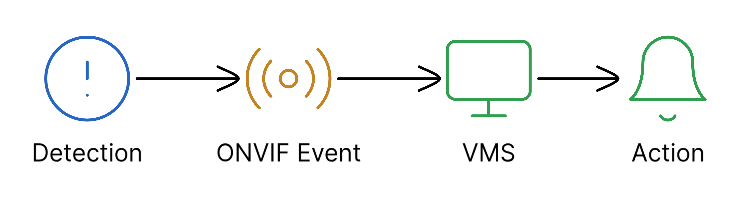
Editing Detections
From the Detections Page
- Click a row to expand and see details
- Edit inline - modify trigger, schedule, or skill reference
- Click the skill name to navigate to the skill editor
- Save changes - updates propagate to all cameras in the group
Navigation to Related Pages
The breadcrumb navigation shows the hierarchy:
AI Configuration > Detections > [current detection]
From Detections, you can navigate to:
- Skills page (AI Configuration > Skills) - edit skill prompts, objects, questions
- Profiles page (AI Configuration > Profiles) - standalone profile management
- Groups page (AI Configuration > Groups) - device organization
Common Use Cases
Security Monitoring
Detection: After-Hours Intrusion Alert
  Group: Building Perimeter
  Trigger: AXIS Object Analytics (Person)
  Schedule: 6 PM - 8 AM weekdays, 24/7 weekends
  Skill: Intrusion Detection
    - Detects: Person, Weapon
    - Questions: "Is the person authorized?"
    - TTS: Warning message when unauthorized
Safety Compliance
Detection: PPE Compliance Check
  Group: Construction Site
  Trigger: AXIS Object Analytics (Person)
  Schedule: Work hours (7 AM - 5 PM)
  Skill: PPE Verification
    - Detects: Hard Hat, Safety Vest
    - Questions: "All PPE present?"
    - TTS: Reminder when PPE missing
Operations Monitoring
Detection: Queue Length Monitor
  Group: Retail Checkout
  Trigger: Schedule (every 60 seconds)
  Schedule: Store hours
  Skill: Queue Analysis
    - Questions: "How many in queue?", "Wait time acceptable?"
    - No TTS (operations data only)
Troubleshooting Detections
When a detection is not working:
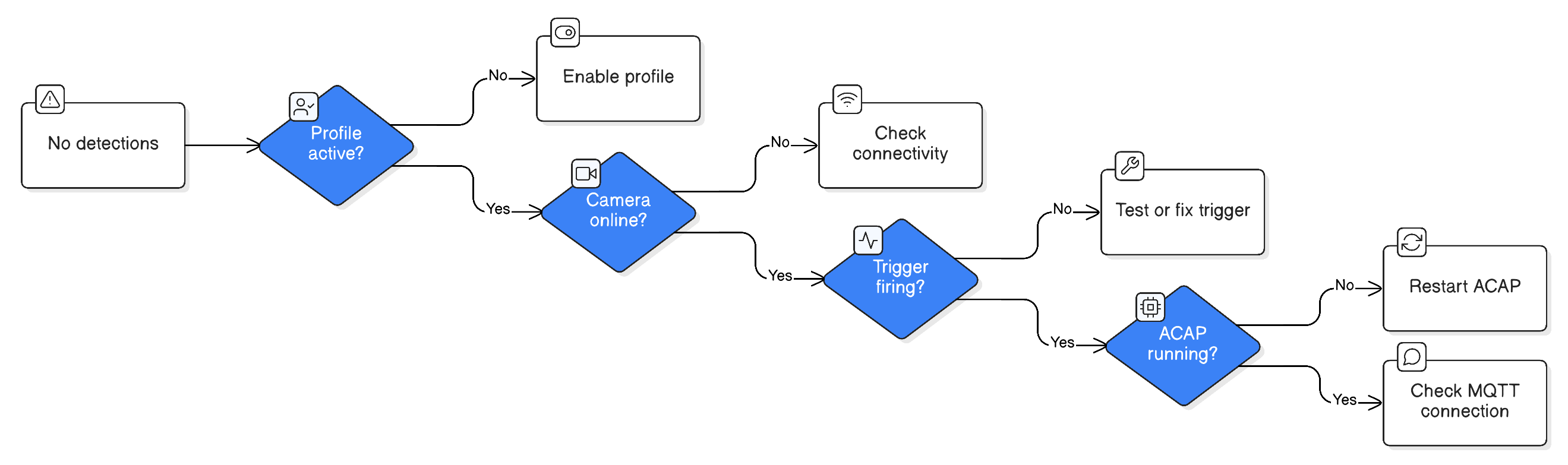
Quick Checks
- Detections page - Is the detection listed?
- Group filter - Is the correct group selected?
- Sessions page - Are analysis sessions appearing?
- Skill configuration - Are objects enabled and stateful?
Best Practices
Naming Conventions
Good detection names include:
- Trigger type
- Purpose
- Schedule (if limited)
| Good | Avoid |
|---|---|
| "Motion - Security - After Hours" | "Profile 1" |
| "AOAS Person - PPE Check" | "New Detection" |
| "Door Sensor - Emergency Exit" | "Test" |
Organization Strategy
- Start with Groups - Organize cameras by location or function
- Create Skills - Define what to detect and how to respond
- Build Profiles - Connect triggers to skills with schedules
- Review in Detections - Verify complete configuration
Regular Maintenance
- Review Detections weekly for unused configurations
- Check Sessions for false positive patterns
- Update skill prompts based on real-world results
Related Topics
- Skills - AI configuration details (prompts, objects, questions)
- Profiles - Trigger and schedule configuration
- Groups - Device organization
- Event Flow - How detections process events
- Creating Your First Detection - Step-by-step tutorial