Troubleshooting
This guide covers common issues encountered when using Anava and their solutions.
Detection Issues
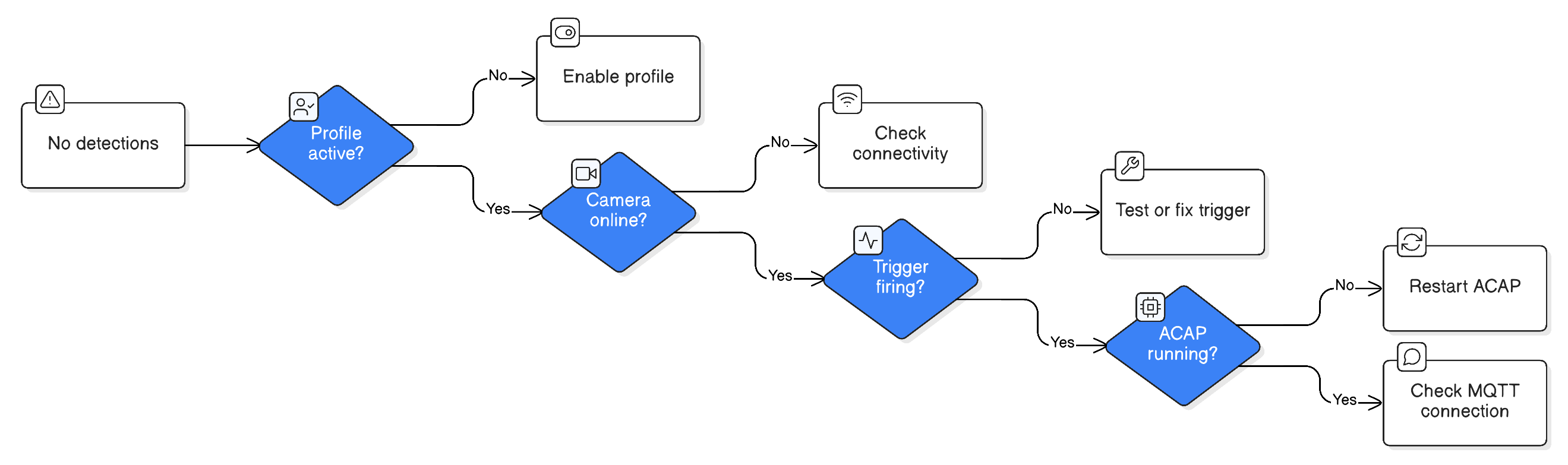
No Detections Occurring
Symptoms: Camera is online but no sessions are created.
Check:
-
Detection exists
- Go to Detections page → Verify detection is listed
- Check schedule matches current time
-
Trigger is firing
- Test trigger manually (motion, AOAS event)
- Check camera event log for trigger events
-
Camera is assigned
- Verify camera is in the group
- Check device shows "Online"
-
ACAP is running
- Check camera web interface → Apps
- Anava ACAP should show "Running"
Solution Path:
Too Many False Positives
Symptoms: Detection fires but nothing is present.
Common Causes:
| Cause | Solution |
|---|---|
| Motion from shadows | Use AOAS Object trigger instead |
| Reflections | Adjust detection area to exclude |
| Weather (rain, snow) | Increase confidence threshold |
| Swaying objects | Refine pre-filter prompt |
Tuning Steps:
- Review false positive sessions
- Identify common pattern
- Update skill pre-filter to exclude
- Increase confidence threshold if needed
- Test and iterate
Missed Detections
Symptoms: Real events not being detected.
Check:
-
Confidence threshold too high
- Lower threshold incrementally
- Review sessions with lower confidence
-
Object not in skill
- Add object type to skill
- Update prompts to include
-
Trigger not capturing
- Check AOAS area configuration
- Verify motion sensitivity
-
Schedule mismatch
- Verify profile is active during event time
Wrong Objects Detected
Symptoms: AI identifies wrong object type.
Solutions:
-
Improve prompts
- Be more specific about what to look for
- Add negative examples ("not a shadow")
-
Add pre-filter
- Filter obvious non-matches early
- Reduce full analysis of irrelevant images
-
Check image quality
- Increase resolution if details unclear
- Review lighting conditions
Camera Issues
Camera Shows Offline
Symptoms: Device status shows offline.
Check:
-
Network connectivity
- Ping camera IP
- Check switch/network equipment
-
Camera power
- Verify PoE power
- Check camera LEDs
-
MQTT connection
- Check camera MQTT settings
- Verify broker is reachable
-
Firewall rules
- Outbound 8883 (MQTT)
- Outbound 443 (HTTPS)
Camera Connects Intermittently
Symptoms: Camera goes online/offline repeatedly.
Common Causes:
| Cause | Solution |
|---|---|
| Network instability | Check switch, cabling |
| PoE power issues | Verify adequate power budget |
| MQTT keepalive | Adjust keepalive interval |
| Firewall timeout | Increase session timeout |
Image Quality Issues
Symptoms: Captured images are dark, blurry, or poor quality.
Check:
-
Resolution setting
- Increase from BALANCED to HIGH
- Consider HD_720 for detail work
-
Camera settings
- Check exposure settings
- Verify focus is correct
- Adjust for lighting conditions
-
View area
- Correct view area selected?
- Camera pointing at right scene?
Connection Issues
ACAP Not Connecting
Symptoms: ACAP installed but shows disconnected.
Check:
-
Certificate status
- Check Edge Vault certificate
- Verify not expired
-
MQTT settings
- Broker URL correct
- Port 8883 open
-
Time sync
- Camera time accurate
- NTP configured
Debug Steps:
Camera Web Interface:
1. System → Logs → Application log
2. Look for MQTT connection errors
3. Note error codes for support
Session Upload Failing
Symptoms: Sessions created but images not showing.
Check:
-
Cloud storage access
- Verify GCS bucket accessible
- Check authentication
-
Network bandwidth
- Large images may timeout
- Lower resolution temporarily
-
ACAP logs
- Check for upload errors
- Note specific failures
Profile Issues
Schedule Not Working
Symptoms: Profile doesn't activate/deactivate on schedule.
Check:
-
Timezone settings
- Camera timezone correct?
- Schedule in correct timezone?
-
Schedule format
- Verify schedule syntax
- Test with "24/7" to confirm basic function
-
Conflicting profiles
- Multiple profiles with different schedules?
- Check priority ordering
TTS Not Playing
Symptoms: Detection occurs but no audio.
Check:
-
TTS enabled
- Object or question has talkdownEnabled = true
- Talkdown rule conditions met
-
Speaker connected
- Camera has audio output
- External speaker connected and working
-
Buffer period
- TalkdownBufferMs prevents rapid repeat
- Wait for buffer to expire
-
Audio test
- Test speaker through camera interface
- Verify audio levels
Notifications Not Sending
Symptoms: Push notifications not received.
Check:
-
Notification enabled
- Object has pushNotification = true
- App notifications allowed
-
Mobile app
- Logged in to correct account
- Notifications enabled in app settings
- Device notifications enabled in OS
-
Detection occurred
- Verify session was created
- Confidence threshold met
Performance Issues
Slow Analysis
Symptoms: Long delay between trigger and results.
Common Causes:
| Cause | Typical Delay | Solution |
|---|---|---|
| High resolution | 2-5 sec | Lower resolution |
| Large images | 2-4 sec | Use BALANCED |
| Active Monitoring | 5-60 sec | Expected for temporal |
| Network latency | Variable | Check connectivity |
High CPU on Camera
Symptoms: Camera performance degraded.
Check:
-
ACAP resource usage
- Check camera CPU in web interface
- Multiple ACAPs running?
-
Too many profiles
- Reduce active profiles
- Combine similar analyses
-
High trigger rate
- Adjust trigger sensitivity
- Use AOAS instead of motion
Queue Backlog
Symptoms: Events taking long to appear.
Solutions:
-
Reduce trigger rate
- Increase trigger thresholds
- Add pre-filtering
-
Simplify skills
- Fewer objects per skill
- Shorter prompts
-
Check system status
- Service degradation?
- Contact support if persistent
Integration Issues
ONVIF Events Not Received
Symptoms: VMS not receiving events from Anava.
Check:
-
Object is stateful
- Object has stateful = true
- Only stateful objects emit ONVIF
-
VMS subscription
- VMS subscribed to camera events
- Check VMS event log
-
Camera ONVIF enabled
- ONVIF services active
- VMS has correct credentials
Webhook Delivery Failing
Symptoms: Webhooks configured but not arriving.
Check:
-
Endpoint accessible
- Test URL manually
- Check firewall rules
-
Response codes
- Endpoint returning 2xx?
- Check for authentication issues
-
Payload format
- Expecting correct JSON structure?
- Check content-type header
Getting Help
Collecting Diagnostics
When contacting support, gather:
-
Camera info
- Model and serial number
- Firmware version
- ACAP version
-
Error details
- Exact error message
- Timestamps
- Steps to reproduce
-
Configuration
- Profile/skill settings
- Trigger configuration
-
Logs
- Camera application logs
- Network traces if applicable
Support Channels
| Issue Type | Channel |
|---|---|
| Bug reports | GitHub Issues |
| Configuration help | Documentation |
| Account issues | support@anava.ai |
| Emergency | Priority support line |
Log Locations
| Log | Location |
|---|---|
| ACAP logs | Camera → System → Logs → Application |
| Events | Anava Console → Sessions |
| System | Anava Console → Admin → Logs |
Related Topics
- Detections Overview - Understanding the Detection model
- Optimization - Reducing false positives
- Event Flow - Understanding the pipeline