Tuning & Optimization
This guide covers strategies for reducing false positives, improving detection accuracy, and optimizing your Anava deployment.
Understanding False Positives
False positives occur when Anava detects something that isn't actually there or misclassifies what it sees.
Common Causes
| Cause | Example | Solution |
|---|---|---|
| Wrong trigger | Motion from shadows | Use AOAS Person trigger |
| Vague prompts | Unclear what to detect | Add specific context |
| Low confidence | Uncertain detections pass | Increase threshold |
| Environmental | Weather, lighting changes | Add pre-filter |
| Scene complexity | Busy areas with many objects | Narrow focus |
Optimization Decision Tree
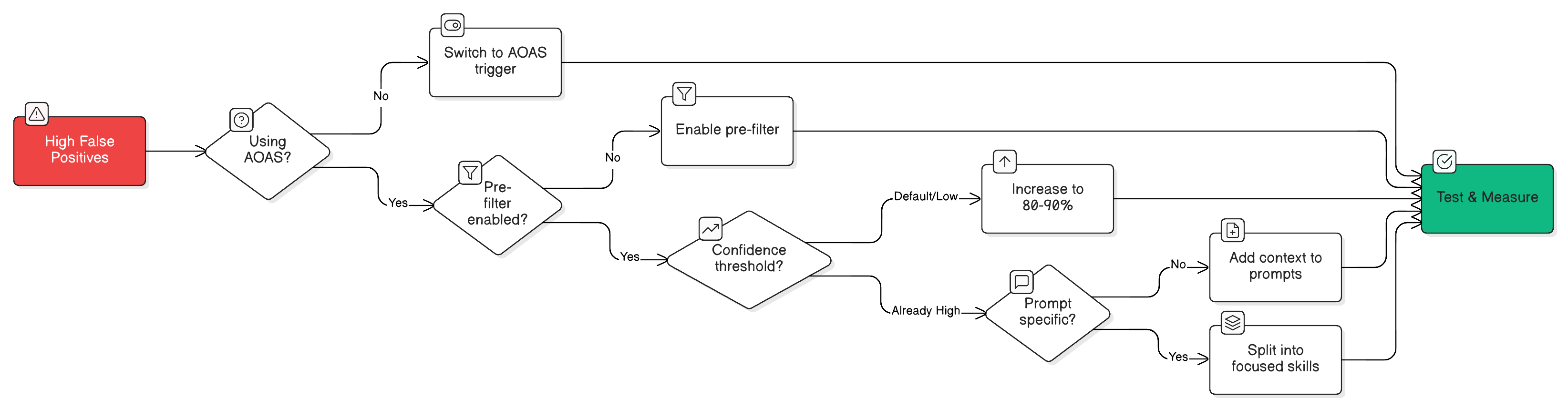
Strategy 1: Use Better Triggers
The trigger is your first line of defense against false positives.
Trigger Effectiveness
| Trigger | False Positive Rate | Best For |
|---|---|---|
| Motion | High | General monitoring |
| AOAS Person | Low | Security, PPE |
| AOAS Vehicle | Low | Parking, traffic |
| Digital Input | Very Low | Door/sensor events |
| Manual | None | Operator-initiated |
Migrating from Motion to AOAS
- Verify camera supports AXIS Object Analytics
- Configure AOAS scenarios on camera
- Create new profile with Object trigger
- Test alongside existing Motion profile
- Disable Motion profile when satisfied
When to Keep Motion
- Camera doesn't support AOAS
- Detecting objects AOAS doesn't recognize
- Very low-traffic areas where every event matters
Strategy 2: Enable Pre-filtering
Pre-filtering adds a fast check before full analysis.
How Pre-filter Works
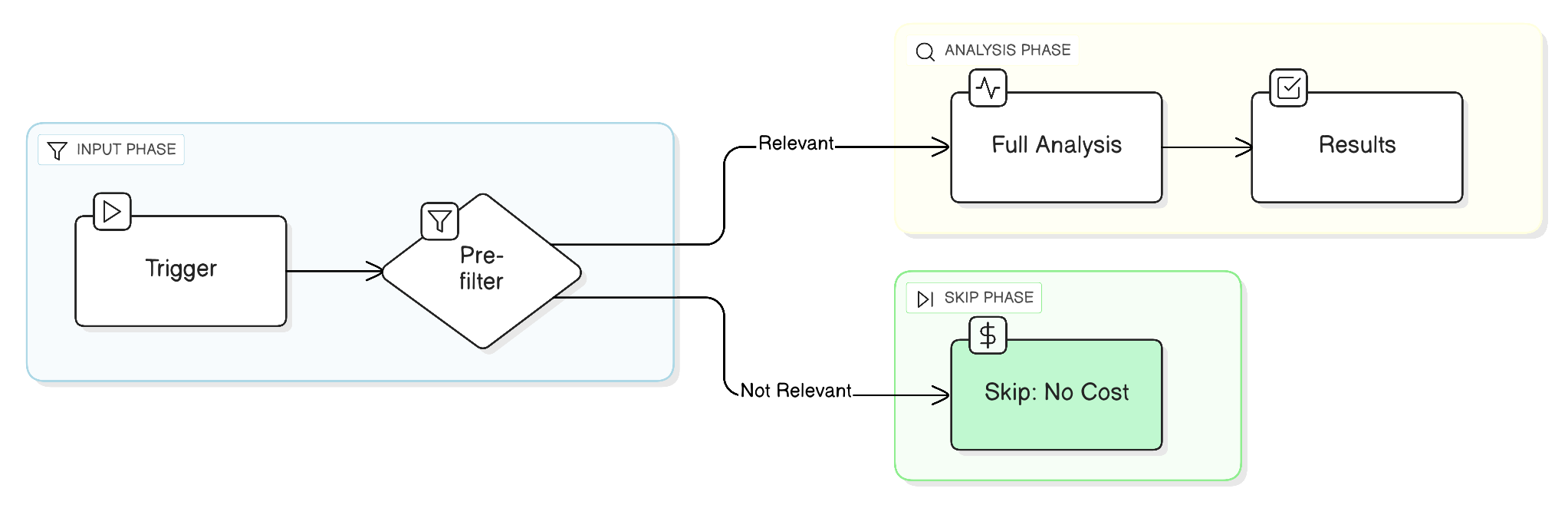
Configuring Pre-filter
In your skill's Analysis Configuration:
Pre-filter Criteria:
Human presence in the frame
Pre-filter Prompt:
Is there a person clearly visible in this image? Answer only yes or no.
Pre-filter Best Practices
| Scenario | Pre-filter |
|---|---|
| Security (people) | "Is there a person?" |
| Vehicle monitoring | "Is there a vehicle?" |
| PPE compliance | "Is there a person in work area?" |
| Fire detection | "Is there smoke or flame visible?" |
When NOT to Use Pre-filter
- Every trigger is potentially critical (e.g., weapon detection)
- Very low-traffic areas
- Latency is critical
Strategy 3: Adjust Confidence Thresholds
Confidence thresholds control when detections become events.
Understanding Confidence
| Level | Meaning | Use |
|---|---|---|
| 0-50% | Low confidence | Usually filtered out |
| 50-70% | Medium confidence | Review needed |
| 70-90% | High confidence | Likely accurate |
| 90-100% | Very high confidence | Almost certain |
Setting Thresholds
In profile settings:
| Use Case | Recommended Threshold |
|---|---|
| Critical (weapons) | 80% |
| Security (intrusion) | 85% |
| Compliance (PPE) | 75% |
| Operations (queues) | 70% |
Trade-offs
Higher Threshold:
├── ✓ Fewer false positives
├── ✓ Less noise
├── ✗ May miss some detections
└── ✗ Could miss edge cases

Lower Threshold:
├── ✓ Catches more events
├── ✓ Good for critical scenarios
├── ✗ More false positives
└── ✗ More review needed
Strategy 4: Improve Prompts
Better prompts lead to better accuracy.
Prompt Improvement Checklist
- Context included (location, time, expectations)
- Specific objects named
- Clear output format defined
- Common false positives addressed
Before/After Examples
Before (Vague):
Look for people in this image.
After (Specific):
This camera monitors a warehouse loading dock. During business hours
(7am-5pm), employees wear yellow vests and hard hats. After hours,
the area should be empty.

Identify any people and determine if they appear to be authorized
employees based on attire and behavior.
Before (No Context):
Detect weapons.
After (Contextual):
Monitor this school entrance for potential weapons. Consider:
- Firearms of any type
- Knives or bladed weapons
- Blunt weapons (bats, clubs)
- Improvised weapons

Exclude common items like umbrellas, sports equipment (when
contextually appropriate), and work tools.
Strategy 5: Split Skills
Focused skills perform better than broad ones.
Signs You Should Split
- Skill has 10+ objects
- Prompts are long and complex
- Different objects need different contexts
- False positives vary by object type
Splitting Example
Before: One Security skill
- Person, Vehicle, Weapon, Fire, Package, Animal, Badge...
After: Focused skills
- Intrusion Detection (Person, Unauthorized Access)
- Weapon Detection (Weapon, Firearm, Knife)
- Fire Safety (Smoke, Flame, Evacuate)
- Package Monitoring (Package, Delivery)
Measuring Improvement
Key Metrics
| Metric | Target | How to Measure |
|---|---|---|
| False Positive Rate | Under 10% | Review sessions, count incorrect |
| Miss Rate | Under 5% | Test with known scenarios |
| Response Time | Under 5s | Check session timestamps |
A/B Testing
- Create new profile with changes
- Run alongside existing profile
- Compare session quality
- Gradually shift to better config
Session Review Process
- Navigate to Sessions
- Filter by profile/skill
- Review random sample (10-20)
- Categorize: True Positive, False Positive, Miss
- Calculate rates
Environment-Specific Tuning
Outdoor Cameras
Challenges:
- Weather (rain, snow, fog)
- Lighting (shadows, sun glare)
- Wildlife (animals triggering)
Solutions:
- Use AOAS with human/vehicle classification
- Add weather context to prompts
- Enable pre-filter for human presence
Indoor Cameras
Challenges:
- Reflections (windows, mirrors)
- Motion (fans, curtains)
- Varying activity levels
Solutions:
- Use AOAS where possible
- Add environmental context
- Schedule-based thresholds
Low-Light Scenarios
Challenges:
- Poor image quality
- IR artifacts
- Thermal noise
Solutions:
- Lower confidence expectations
- Simpler detection goals
- Consider higher resolution
Troubleshooting Specific Issues
"Person" Detections on Objects
Problem: Mannequins, posters, or statues trigger person detection.
Solutions:
- Add to prompt: "Ignore mannequins, posters, and stationary displays"
- Use AOAS Person (better at distinguishing)
- Increase confidence threshold
Motion from Environmental Factors
Problem: Shadows, trees, or lighting changes trigger motion.
Solutions:
- Switch to AOAS trigger
- Enable pre-filter with "Is there a person/vehicle?"
- Adjust camera's motion sensitivity
Inconsistent Results
Problem: Same scenario gives different results.
Solutions:
- Make prompts more structured
- Use boolean questions for consistency
- Review multiple sessions to find patterns
Related Topics
- Detections Overview - Understanding the Detection model
- Confidence Tuning - Detailed threshold configuration
- Learning Mode - Active monitoring setup
- Best Practices - Detection design patterns