Group Design
Groups are the organizational containers in Anava that hold cameras, skills, and profiles. Well-designed group structure makes management scalable and efficient.
Understanding Groups
What is a Group?
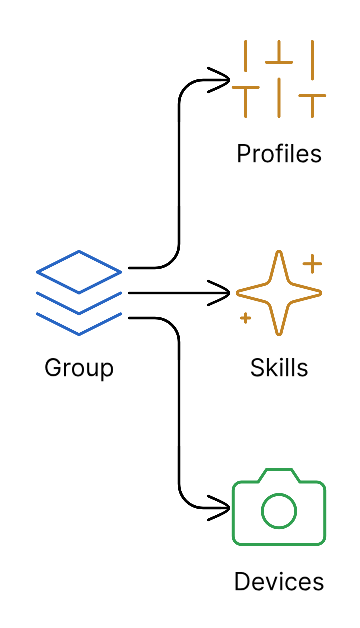
A group is a logical container that:
- Holds one or more cameras
- Contains skills (AI analysis definitions)
- Contains profiles (trigger-to-skill mappings)
- Provides unified configuration for all devices
Group Properties
| Property | Description |
|---|---|
| Name | Display name for the group |
| Description | Purpose and scope |
| Status | Active or inactive |
| Skills | AI analysis configurations |
| Profiles | Trigger-to-skill mappings |
| Cameras | Assigned devices |
Design Principles
1. Group by Function, Not Location
Recommended:
├── Security Operations
│   ├── Perimeter Security (cameras: gates, fences)
│   ├── Entrance Control (cameras: doors, lobbies)
│   └── Restricted Areas (cameras: server rooms)
├── Safety Compliance
│   ├── PPE Zones (cameras: work areas)
│   └── Emergency Exits (cameras: exit paths)
└── Operations
    ├── Queue Monitoring (cameras: service areas)
    └── Occupancy Tracking (cameras: common spaces)
Avoid:
├── Building A (mixed purposes)
├── Building B (mixed purposes)
└── Parking (no clear function)
2. One Skill Set Per Group
Keep groups focused:
| Good | Avoid |
|---|---|
| "Entrance Security" with entrance-focused skills | "All Security" with 20+ different skills |
| "PPE Compliance" with safety skills | "Everything" with unrelated skills mixed |
3. Right-Size Your Groups
| Scale | Recommended Cameras per Group |
|---|---|
| Small site | 5-15 cameras |
| Medium site | 10-25 cameras |
| Enterprise | 15-50 cameras |
Why? Groups that are too large become hard to manage. Too small creates configuration sprawl.
Common Patterns
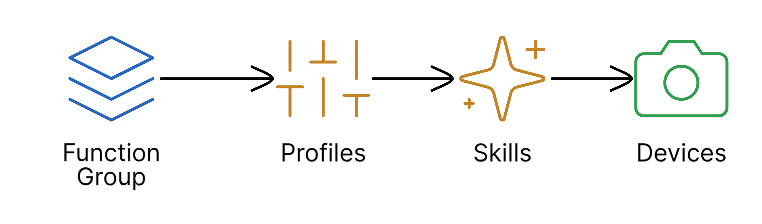
Pattern 1: Function-Based Groups
Organize by what cameras monitor:
Best for:
- Clear functional boundaries
- Different teams manage different functions
- Skills are distinct per function
Pattern 2: Shift-Based Groups
Organize by when cameras are active:
├── 24/7 Critical (always monitored)
├── Business Hours (office areas)
├── After Hours (security focus)
└── Weekend Only (special events)
Best for:
- Strong schedule-based requirements
- Different security levels by time
- Resource optimization
Pattern 3: Zone-Based Groups
Organize by physical security zones:
├── Public Zone (visitor areas)
├── Semi-Secure (employee areas)
├── Secure Zone (controlled access)
└── Critical Zone (highest security)
Best for:
- Compliance requirements (NERC CIP, etc.)
- Access control integration
- Graduated response protocols
Pattern 4: Hybrid Approach
Combine patterns for complex sites:
├── Perimeter Security (function + 24/7)
│   ├── Fence Line Cameras
│   └── Gate Cameras
├── Building Entrance (function + business hours)
│   ├── Lobby Cameras
│   └── Door Cameras
└── Data Center (zone + 24/7)
    ├── Cage Cameras
    └── Aisle Cameras
Sizing Guidelines
When to Split Groups
Split a group when:
- Camera count exceeds 50
- Skills have conflicting purposes
- Different teams need different access
- Schedules are fundamentally different
When to Combine Groups
Combine groups when:
- Cameras share identical configurations
- Management overhead exceeds value
- Skills are reused across small groups
Group Limits
| Metric | Soft Limit | Hard Limit |
|---|---|---|
| Cameras per group | 50 | 100 |
| Skills per group | 10 | 25 |
| Profiles per group | 20 | 50 |
Enterprise Examples
Example 1: Corporate Campus
Groups:
  - name: "Campus Perimeter"
    cameras: 35
    skills: [Intrusion Detection, Vehicle Recognition]
    profiles: [24/7 Perimeter Watch, Gate Activity]

  - name: "Building Entrances"
    cameras: 24
    skills: [Entrance Security, Tailgating Detection]
    profiles: [Business Hours Entry, After Hours Alert]

  - name: "Executive Floor"
    cameras: 12
    skills: [Authorization Check, VIP Recognition]
    profiles: [Always On - High Alert]

  - name: "Parking Facilities"
    cameras: 28
    skills: [Vehicle Monitoring, Pedestrian Safety]
    profiles: [24/7 Vehicle Watch]
Example 2: Manufacturing Plant
Groups:
  - name: "Production Floor Safety"
    cameras: 40
    skills: [PPE Compliance, Hazard Zone]
    profiles: [Shift Hours PPE, Emergency Detection]

  - name: "Loading Dock Operations"
    cameras: 15
    skills: [Vehicle Detection, Package Tracking]
    profiles: [Business Hours Dock, Delivery Verification]

  - name: "Plant Perimeter"
    cameras: 25
    skills: [Intrusion Detection]
    profiles: [24/7 Perimeter]

  - name: "Quality Control"
    cameras: 10
    skills: [Defect Detection, Process Monitoring]
    profiles: [Production Hours QC]
Example 3: Retail Chain
# Per-Store Template
Groups:
  - name: "Store 001 - Sales Floor"
    cameras: 12
    skills: [Customer Analytics, Theft Prevention]
    profiles: [Store Hours Analytics]

  - name: "Store 001 - Backroom"
    cameras: 6
    skills: [Inventory Security, Employee Safety]
    profiles: [24/7 Backroom Watch]

  - name: "Store 001 - Entrance"
    cameras: 4
    skills: [Customer Counting, Shoplifting Alert]
    profiles: [Store Hours Entry]
Migration Planning
From Flat Structure
If you have all cameras in one group:
-
Inventory current setup
- List all cameras and their purposes
- Identify skill requirements per camera
-
Design new structure
- Apply function-based or zone-based pattern
- Create new groups (don't modify existing)
-
Migrate incrementally
- Move 5-10 cameras at a time
- Verify functionality after each batch
- Keep old group until migration complete
From Legacy VMS Groups
If importing from VMS structure:
-
Don't replicate VMS groups directly
- VMS groups often based on recorder capacity
- Anava groups should be based on function
-
Map functions to new groups
- Identify what each camera monitors
- Group by analysis needs, not hardware
Best Practices
Naming Conventions
| Pattern | Example | Use Case |
|---|---|---|
| Function-Location | Security-MainEntrance | Clear purpose |
| Zone-Function | ZoneA-Perimeter | Compliance-focused |
| Site-Function | HQ-ExecutiveFloor | Multi-site deployment |
Documentation
Maintain for each group:
- Purpose and scope
- Camera inventory with purposes
- Skill/profile explanations
- Contact/escalation information
Review Cadence
| Frequency | Review |
|---|---|
| Monthly | Camera additions/removals |
| Quarterly | Skill effectiveness |
| Annually | Group structure optimization |
Troubleshooting
Too Many Groups
Symptoms:
- Configuration sprawl
- Duplicate skills across groups
- Management overhead high
Solution:
- Consolidate groups with similar purposes
- Use profiles for scheduling instead of separate groups
Too Few Groups
Symptoms:
- 100+ cameras in one group
- Conflicting skill requirements
- Can't give team-specific access
Solution:
- Split by function or zone
- Create focused groups with specific purposes
Related Topics
- Bulk Operations - Managing many cameras
- Device Overrides - Per-camera customization
- Groups Reference - Group configuration