Integration Overview
Anava integrates with your existing security infrastructure through standard ONVIF events, webhooks, and email notifications. This guide provides an overview of integration options.
Integration Architecture
The following diagram shows how Anava integrates with your existing security infrastructure:
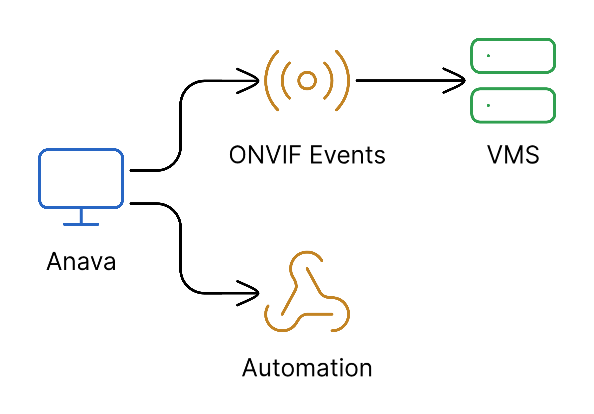
Integration Options
| Method | Best For | Complexity |
|---|---|---|
| ONVIF Events | VMS integration (Milestone, Genetec, ACS) | Low |
| Webhooks | Custom applications, automation | Medium |
| Notifications, reports | Low | |
| Push Notifications | Mobile alerts | Low |
ONVIF Events
Anava emits standard ONVIF events that any compatible VMS can receive.
How It Works
- Anava AI detects objects or answers questions
- Camera emits ONVIF event for each detection
- VMS receives event through standard subscription
- VMS triggers action rules (record, alert, etc.)
Event Types
| Detection | ONVIF Event | VMS Use |
|---|---|---|
| Object detected | Boolean (true/false) | "Is True" action rules |
| Object cleared | Boolean (false) | Auto-stop recording |
| Question answered | String data | Custom actions |
VMS Compatibility
Anava works with any ONVIF-compliant VMS:
| VMS | Guide | Notes |
|---|---|---|
| Milestone XProtect | Setup Guide | Action rules, alarms |
| Genetec Security Center | Setup Guide | Custom events, actions |
| Axis Camera Station | Setup Guide | Native integration |
| Other ONVIF VMS | Generic Guide | Standard setup |
Webhooks
For custom integrations, Anava can send HTTP POST requests to your endpoints.
Webhook Payload
{
  "eventType": "detection",
  "deviceId": "B8A44F45D624",
  "groupId": "warehouse-north",
  "profileId": "intrusion-detection",
  "skillId": "weapon-detection",
  "timestamp": "2024-12-23T10:30:00Z",
  "objects": [
    {"name": "Person", "detected": true, "confidence": 0.95}
  ],
  "questions": [
    {"name": "is_authorized", "answer": false}
  ],
  "sessionId": "ses_abc123"
}
Webhook Configuration
See Webhooks Guide for:
- Endpoint configuration
- Authentication options
- Retry policies
- Error handling
Email Notifications
Anava can send email alerts for specific detections.
Email Features
- Immediate alerts for high-priority detections
- Digest summaries (hourly, daily)
- Customizable templates
- Image attachments
Configuration
See Email Setup for:
- Email provider configuration
- Recipient management
- Template customization
- Alert routing
Choosing the Right Integration
Use ONVIF Events When...
- You have a VMS that should respond to Anava detections
- You want recording triggered by AI analysis
- You need alarm/alert integration with existing systems
- Real-time response is critical
Use Webhooks When...
- You need custom application integration
- You want to trigger external systems (access control, lighting)
- You're building automation workflows
- You need full detection data in JSON format
Use Email When...
- You need human notification for specific events
- You want daily/weekly summaries
- VMS integration isn't available
- Remote/mobile notification is needed
Common Integration Patterns
Pattern 1: VMS Recording + Email Alert
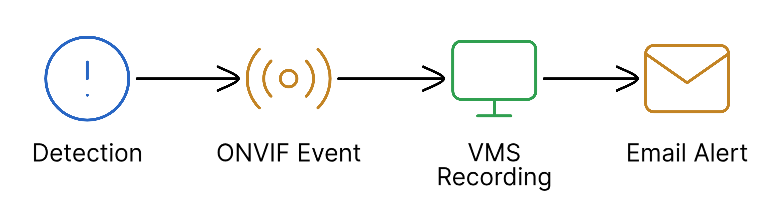
Use Case: Security team wants VMS to record automatically while also receiving immediate email notification for review.
Pattern 2: Webhook Automation

Use Case: After-hours intrusion should trigger multiple automated responses.
Pattern 3: Tiered Response
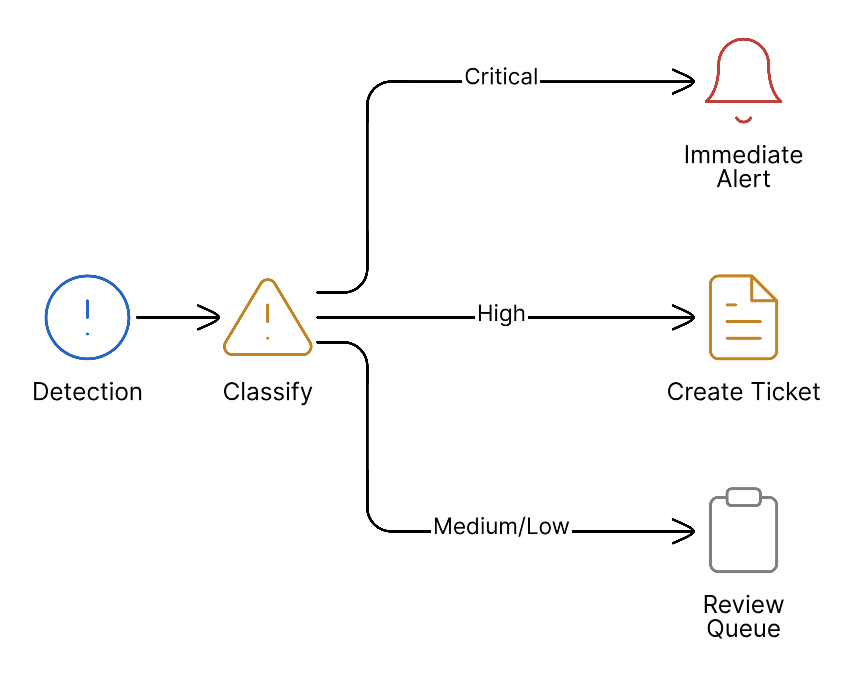
Use Case: Different response levels based on detection confidence.
Next Steps
Choose your primary integration method:
- Milestone XProtect - Industry-leading VMS
- Genetec Security Center - Unified security platform
- Axis Camera Station - Axis-native VMS
- Generic ONVIF - Any ONVIF-compatible system
- Webhooks - Custom integrations
- Email Setup - Notification configuration